HTML Report
After each pipeline run, HEDGEHOG generates a self-contained interactive HTML report at:
results/run_N/report.htmlThe report uses Plotly.js for interactive charts and includes a model filter dropdown that lets you view metrics for individual generative models or compare all models side-by-side.
Report Sections
Generator Reality Assessment
Generator Reality Assessment scorecard in RUN_INFO.md is an optional chart in the HTML report when scoring data is available.
It summarizes each model with:
Generator Reality Score(0.0–100.0) used for ranking how well the model’s initial generated set survives the pipeline gates.Final Candidate Pool Quality(0.0–100.0), a secondary survivor-pool score for the molecules that already passed the pipeline.Grade(Excellent,Strong,Moderate,Weak) for quick triage.Confidence(High,Medium,Low) for reliability assessment.Main Bottlenecklist to show the weakest components.
How the score is assembled
The score is collected per model_name. If a CSV does not have model_name, HEDGEHOG treats it as an aggregate __all__ model. This is an explainable ranking scorecard to compare models inside the same experiment and then validate best candidates with the underlying stage level reports. Component scores are normalized to 0..100.
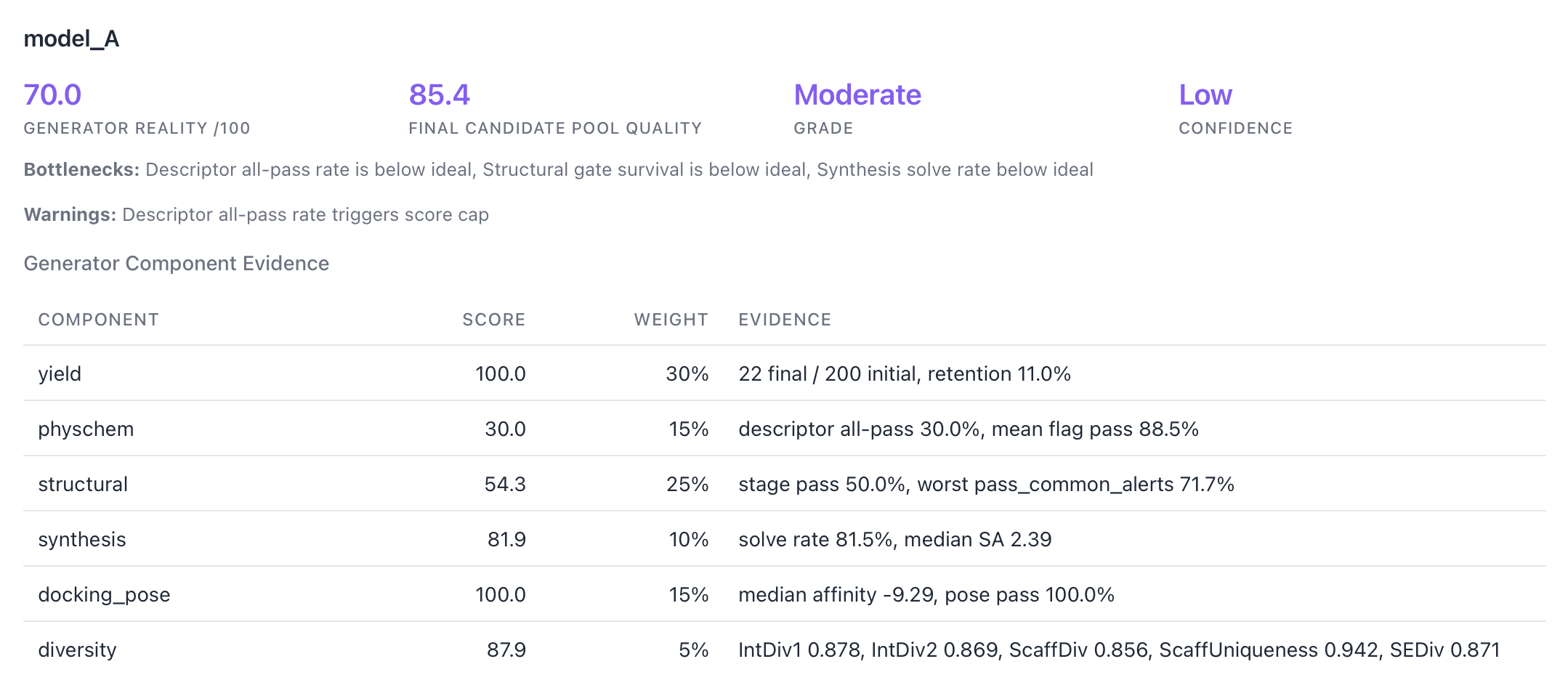
The report generator reads these sources:
| Component | Weight | Source files | Evidence collected |
|---|---|---|---|
yield | 0.30 | input/sampled_molecules.csv, output/final_molecules.csv, root final_molecules.csv, final descriptor or docking-filter fallback CSVs | Initial count, final count, final retention rate, clipped to 0..1. |
physchem | 0.15 | stages/02_descriptors_initial/filtered/pass_flags.csv, stages/02_descriptors_initial/metrics/descriptors_all.csv, with final descriptor files only as fallback | Descriptor all-pass rate, mean flag pass rate for evidence, worst flag |
structural | 0.25 | stages/03_structural_filters_post/filtered_molecules.csv, stages/03_structural_filters_post/failed_molecules.csv | Stage pass rate, weakest structural flag, mean flag pass rate for evidence, filtered/failed counts. 0.80 * structural_stage_pass_rate + 0.20 * worst_filter_pass_rate by default. |
synthesis | 0.10 | stages/04_synthesis/synthesis_extended.csv, synthesis_scores.csv, with filtered_molecules.csv only as fallback | Solve rate, median scores and search time across molecules evaluated by synthesis |
docking_pose | 0.15 | stages/06_docking_filters/metrics.csv, filtered_poses.csv, with final molecule files only as fallback | Median affinity, median CNNscore, median CNNaffinity, pose pass rates across docking-filter input poses |
diversity | 0.05 | Already computed moleval.by_stage.Input in report_data.json, with DockingFilters only as fallback | IntDiv1, IntDiv2, ScaffDiv, ScaffUniqueness, SEDiv for the model input set |
The final model score is:
overall = sum(component_weight * component_score) / sum(available_component_weights)Missing components are not scored as zero. They are marked available: false, excluded from the denominator, and recorded as warnings where appropriate, and the remaining weights are renormalized automatically. Confidence drops when too few components or final molecules are available. If evidence is sparse (final molecules is low and/or several components are missing), Confidence drops from High to Medium or Low.
The generator score also supports hard caps for critical funnel failures. By default, a structural stage pass rate below 0.20 caps the score at 60, a descriptor all-pass rate below 0.50 caps it at 70, and a final retention rate below 0.05 caps it at 70. These caps prevent a model from looking strong when an AND-gate stage rejects most of its generated molecules.
Final Candidate Pool Quality inspect the final pool: yield uses final-count saturation, physchem uses the mean descriptor flag pass rate, structural uses the mean structural flag pass rate, and synthesis/docking/diversity use the same component formulas.
To configure or disable this section, use:
config_weighted_score: src/hedgehog/configs/config_weighted_score.ymlSet run: false in that file to remove the generator reality assessment from the report.
You can tune docking/synthesis behavior in this config to move rankings toward affinity-rich or synthetic tractability-focused models:
- Docking thresholds are configured under
docking(bad_affinity/good_affinity,bad_cnnscore/good_cnnscore,bad_cnnaffinity/good_cnnaffinity). - Synthesis thresholds are configured under
synthesis(sa_*,ra_*,syba_*,target_search_time_sec).
Pipeline Flow (Sankey Diagram)
Report displays a Sankey diagram showing how molecules flow through the pipeline. Each node represents a pipeline stage, and the width of each link is proportional to the number of molecules that survive that transition.
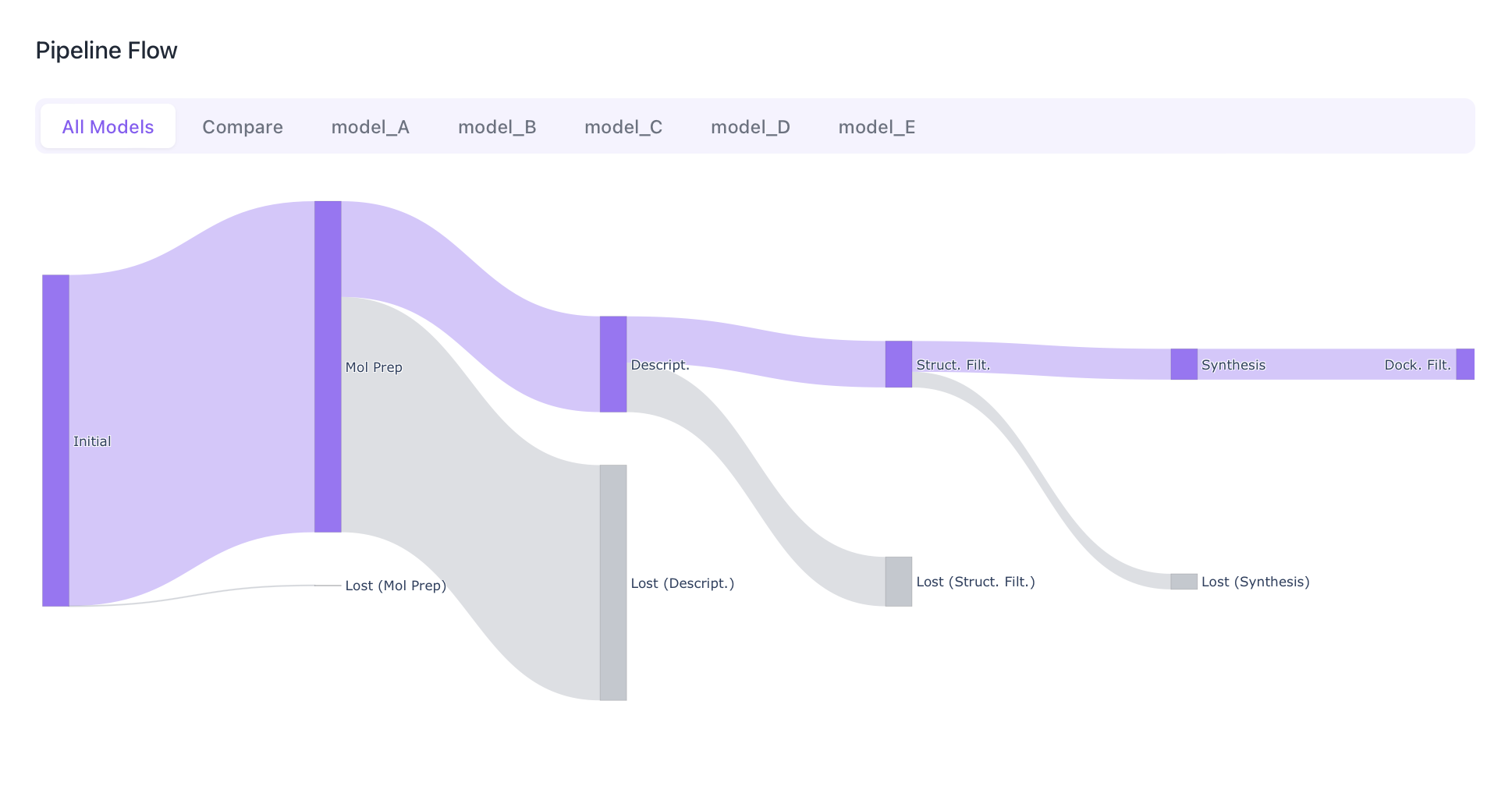
- Purple links represent molecules that pass to the next stage.
- Gray “Lost” nodes branch off at each transition, showing how many molecules were filtered out.
- Hover over any link or node to see exact counts and percentages relative to the initial set.
A classic funnel chart is also included, showing the absolute molecule count at each stage with percentage-of-initial annotations.
Executive Summary
Four summary cards display key pipeline statistics:
| Card | Description |
|---|---|
| Initial Molecules | Total molecules entering the pipeline |
| Final Molecules | Molecules surviving all stages |
| Retention Rate | Percentage of molecules retained end-to-end |
| Stages Completed | Number of pipeline stages that ran successfully |
A stage status table shows each stage as COMPLETED, FAILED, or DISABLED.
Model Comparison
When the input contains molecules from multiple generative models, the report includes:
- Grouped bar chart comparing initial vs. final molecule counts per model with retention rates.
- Stacked bar chart showing where molecules were lost (by stage) for each model.
- A model dropdown at the top of the report to filter all sections by a single model or compare all.
Descriptor Analysis
Two descriptor sections appear in the report — one for initial descriptors (computed early in the pipeline) and one for final descriptors (recomputed on surviving molecules). Bar plots and Summary table are broken down by model.
Drug-likeness threshold lines are included as reference markers in the interactive histograms.
Interpreting Comparison Histograms
When comparing generated molecules against reference sets:
- Overlapping distributions indicate that generated molecules match the reference property profile.
- Shifted distributions highlight systematic differences (e.g., generated molecules are heavier or more lipophilic than references).
- Use the model list to isolate individual models and see which generator best matches the target property space.
Structural Filters Analysis
This section covers the structural filtering stages.
- Heatmap of banned ratios (fraction of molecules failing each filter) by model.
- Common Alerts breakdown with detailed pass rates per rule set.
Synthesis Analysis
The synthesis section presents scores from calculated scores with Bar plots for each score distribution.
Docking Results
The docking section reports binding affinity results from GNINA, SMINA, and Matcha:
- Box plots of affinity scores grouped by model.
- Top molecules table listing the best-scoring compounds with their affinities.
Docking Filters
If docking filters are enabled, this section shows:
- Per-filter pass/fail stats for each enabled filter .
- Histograms of numeric metrics with threshold lines.
- Pass rate by model of total poses and pass rates.
- Interaction profile (ProLIF) when interaction reporting is enabled: top-contact residues, interaction type distribution, and residue × interaction-type heatmap.
Generative Metrics (MolEval)
This section reports intrinsic distribution quality metrics computed by the vendored MolEval library. See the MolEval Metrics page for detailed metric definitions.
Output Files
After report generation, the run directory contains:
| File | Description |
|---|---|
report_data.json | Raw JSON data used to build the report |
report.html | Self-contained interactive HTML report |
RUN_INFO.md | Markdown summary with MolEval metrics table |
stage_filter_audit.ipynb | Jupyter notebook for molecule-level stage audit with mols2grid |
Configuration
Report generation is triggered automatically by hedgehog after all pipeline stages complete.
The MolEval sections require a valid config_moleval path in the pipeline configuration:
config_moleval: src/hedgehog/configs/config_moleval.ymlSee MolEval Configuration for all available options.